Product Updates 2026

What's New?
Here's what we've been working on this month
September
- We're switching our call recording from MP3 to Opus: Opus is designed specifically to handle speech efficiently, making it a good fit for recording conversations, transcriptions, and AI analytics. Your CSM will be in touch regarding when the switch will occur
- Choose whether to hide the lead count on the Campaign - a useful setting to prevent agents from choosing only the Campaigns with the highest number of available leads. This setting can be found in Edit Campaign, under Other Settings.
- Made improvements to the user interface for Triggers,
- In Caller IDs, you can now sort the display by Contact Attempts. We've also increased the number of Caller IDs you can order to 150
- Monitor calls in Live Operations without granting microphone access to your browser
- We now support the export of Lead Admin views to Excel
- You can now call an alternative lead number when handling a DialBack call.
August
A modern foundation for the Contact Page
We've updated the Contact Page with a refreshed, modern design while keeping the experience you know. All features, tools, and workflows remain exactly the same, so you can continue working without interruption or the need to learn anything new.
Although the changes are subtle on the surface, we've also modernised the technology behind the Contact Page. This provides a stronger foundation for the future, making the application easier to maintain, more reliable, and better equipped to support new features and enhancements.
What this means for you:
- The same familiar workflow - everything is still where you expect it to be
- A cleaner, more modern interface - the Contact Page has been visually refreshed while maintaining its familiar layout.
- A more reliable experience - the updated foundation helps us improve stability and resolve issues more efficiently
- Faster innovation - future enhancements can be developed and delivered more quickly, allowing us to bring improvements to you at a faster pace.
This update will be rolled out slowly and is part of our ongoing commitment to continuously improve the platform while keeping your day-to-day work familiar and uninterrupted. Look out for an in-app message to learn when your Contact Page will be updated.
July
- Reduce caller frustrations and improve your customer service by adding queue position announcements to your incoming calls queues! Use our built-in messages in 7 languages, or upload custom files to stay on-brand.
- We've made big improvements to our call transfer capabilities: you can now do an internal hot transfer to a team, as well as a hot or cold transfer on predictive dialer campaigns.
- Get greater control over which leads are dialed first in your campaigns by choosing to dial unprocessed fresh leads before automatic redials. Go to Edit Campaign > Dialer Settings to configure the sort order, and to enable internal hot transfer.
May
- We've partnered with IntraManager to bring you IntraManager Board, directly embeded into your Enreach Outbound environment. It transforms KPI data into live dashboards, competitions, achievements, and real-time performance insights that help drive engagement and results. Track activity, react fast, and work more efficiently without switching between systems. Read more here!
- If you're using our online meeting booking module, you can now get an easy overview of meetings without feedback on your mobile calendar site.
- You can now edit custom KPIs created in Reports, giving you greater control over your reporting needs.
- Ordering Caller IDs now requires a separate feature permission - 'Order Caller IDs'.
- Get alerts in-app when your new Caller IDs have been delivered!
April
- Smart Talk Insights is Enreach Outbound's conversation AI platform, transforming all your customer interactions to actionable results. Read our quick intro here, or watch the webinar and request a demo on our website.
March
- New to Enreach Outbound or need a refresher? We now have a selection of quick start guides to get you up and running in no time. They can be found in our help center, under the Onboarding menu.
February
- We've upgraded the call recording quality to deliver more accurate transcriptions and sentiment detection for our AI solutions.
- We've fixed a bug affecting leads uploaded without country codes.
January
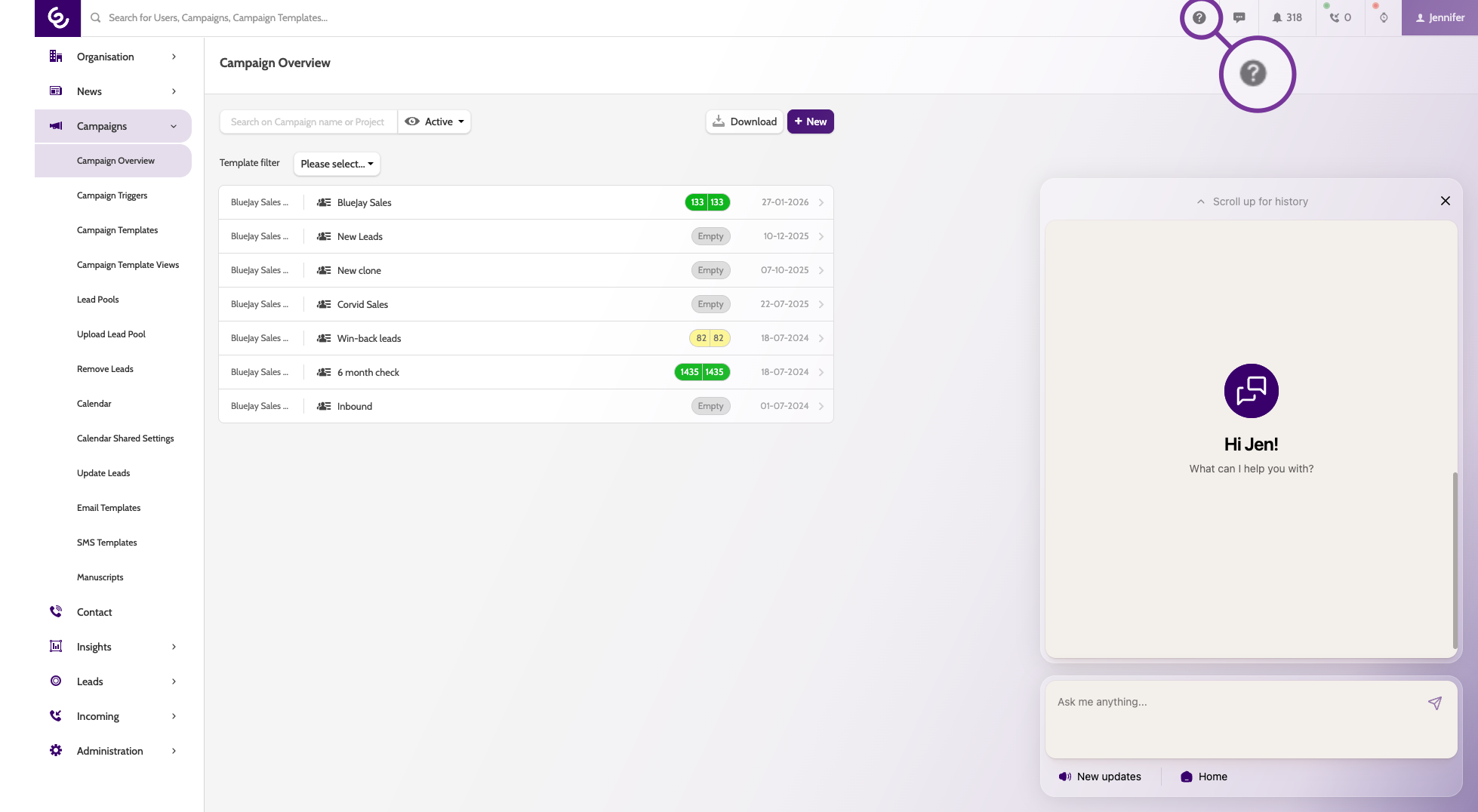
- Please welcome your Kit, your Outbound Navigator! Kit is an Outbound expert and can help you with all your questions, from ideal configurations for boosting contact rate, to creating a Trigger to push lead data to your CRM. Find Kit in the top bar by clicking on the question mark. Product update news and access to the help center is also here:
- When uploading caller IDs in bulk, you can now upload them with the Project, a Description, and an Incoming number to forward to.
- Lead log now shows the time interval for planned redial.
- We’ve added more alerts to the alert center, so you can keep on top of your set-up.